Transform Data Type
Camel supports the Message Translator from the EIP patterns.
How can systems using different data formats communicate with each other using messaging?
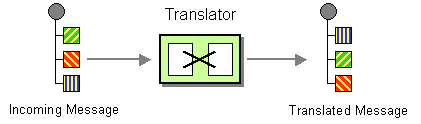
Use a special filter, a Message Translator, between other filters or applications to translate one data format into another.
The Message Translator can be done in different ways in Camel:
-
Using template-based Components, with the template being the source for how the message is translated
-
Messages can also be transformed using Data Format to marshal and unmarshal messages in different encodings.
-
Using data type based transformation using Transform DataType
This page is documenting the last approach by using Transform Data Type EIP.
Options
The Transform Data Type eip supports the following options which are listed below.
| Name | Description | Default | Type |
|---|---|---|---|
note | The note for this node. | String | |
description | The description for this node. | String | |
disabled | Whether to disable this EIP from the route during build time. Once an EIP has been disabled then it cannot be enabled later at runtime. | false | Boolean |
fromType | The source data type URN in the format 'scheme:name' (e.g. 'java:com.example.MyClass'). If not specified, the current message body type is used. | String | |
toType | Required The target data type URN in the format 'scheme:name' (e.g. 'json:JsonOrder') that the message body should be transformed into. | String |
Using Transform DataType EIP
The Transform DataType references a given from/to data type (org.apache.camel.spi.DataType).
-
Java
-
XML
-
YAML
from("direct:cheese")
    .transformDataType("myDataType")
    .to("log:hello");
<route>
<from uri="direct:cheese"/>
<transformDataType toType="myDataType"/>
<to uri="log:hello"/>
</route>- route:
from:
uri: direct:cheese
steps:
- transformDataType:
toType: myDataType
- to:
uri: log:helloThe example above defines the Transform DataType EIP that uses a target data type myDataType. The given data type may reference a Transformer that is able to handle the data type transformation.
Users may also specify fromType in order to reference a very specific transformation from a given data type to a given data type. |