To D
Camel supports the Message Endpoint from the EIP patterns using the Endpoint interface.
How does an application connect to a messaging channel to send and receive messages?
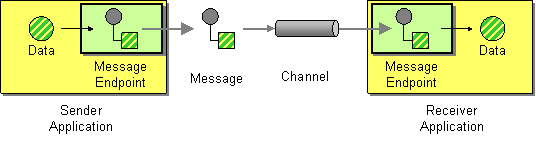
Connect an application to a messaging channel using a Message Endpoint, a client of the messaging system that the application can then use to send or receive messages.
Options
The To D eip supports the following options which are listed below.
| Name | Description | Default | Type |
|---|---|---|---|
note | The note for this node. | String | |
description | The description for this node. | String | |
disabled | Whether to disable this EIP from the route during build time. Once an EIP has been disabled then it cannot be enabled later at runtime. | false | Boolean |
uri | Required The uri of the endpoint to send to. The uri can be dynamic computed using the simple language. | String | |
variableSend | To use a variable as the source for the message body to send. This makes it handy to use variables for user data and to easily control what data to use for sending and receiving. | String | |
variableReceive | To use a variable to store the received message body (only body, not headers). This makes it handy to use variables for user data and to easily control what data to use for sending and receiving. | String | |
pattern | Sets the optional ExchangePattern used to invoke this endpoint. Enum values:
| ExchangePattern | |
cacheSize | Sets the maximum size used by the ProducerCache which is used to cache and reuse producers when uris are reused. Use 0 for default cache size, or -1 to turn cache off. | Integer | |
ignoreInvalidEndpoint | Whether to ignore invalid endpoint URIs and skip sending the message. | false | Boolean |
allowOptimisedComponents | Whether to allow components to optimise toD if they are SendDynamicAware. | true | Boolean |
autoStartComponents | Whether to auto startup components when toD is starting up. | true | Boolean |
allowedSchemes | Sets an optional comma-separated allow-list of component schemes that the dynamic recipient may resolve to (e.g. http,https). When set, a dynamic endpoint whose scheme is not in the list is rejected. This is a defence-in-depth restriction, useful for low-code / Kamelet deployments; by default (unset) any scheme is allowed. | String |
Exchange properties
The To D eip supports the following exchange properties which are listed below.
The exchange properties are set on the Exchange by the EIP, unless otherwise specified in the description. This means those properties are available after this EIP has completed processing the Exchange.
| Name | Description | Default | Type |
|---|---|---|---|
CamelToEndpoint | Endpoint URI where this Exchange is being sent to. | String |
Different between To and ToD
The to is used for sending messages to a static endpoint. In other words to sends messages only to the same endpoint.
The toD is used for sending messages to a dynamic endpoint. The dynamic endpoint is evaluated on-demand by an Expression. By default, the Simple expression is used to compute the dynamic endpoint URI.
Using ToD
For example, to send a message to an endpoint which is dynamically determined by a message header, you can do as shown below:
-
Java
-
XML
-
YAML
from("direct:start")
  .toD("${header.foo}");
<route>
<from uri="direct:start"/>
<toD uri="${header.foo}"/>
</route>- route:
from:
uri: direct:start
steps:
- toD:
uri: "${header.foo}"You can also prefix the uri with a value because the endpoint URI is evaluated using the Simple language:
-
Java
-
XML
-
YAML
from("direct:start")
  .toD("mock:${header.foo}");
<route>
<from uri="direct:start"/>
<toD uri="mock:${header.foo}"/>
</route>- route:
from:
uri: direct:start
steps:
- toD:
uri: "mock:${header.foo}"In the example above, we compute the dynamic endpoint with a prefix "mock:" and then the header foo is appended. So, for example, if the header foo has value order, then the endpoint is computed as "mock:order".
Using other languages with toD
You can also use other languages such as XPath. Doing this requires starting with language: as shown below. If you do not specify language: then the endpoint is a component name. And in some cases, there is both a component and language with the same name such as xquery.
-
Java
-
XML
-
YAML
from("direct:start")
  .toD("language:xpath:/order/@uri");
<route>
<from uri="direct:start"/>
<toD uri="language:xpath:/order/@uri"/>
</route>- route:
from:
uri: direct:start
steps:
- toD:
uri: language:xpath:/order/@uriAvoid creating endless dynamic endpoints that take up resources
When using dynamic computed endpoints with toD then you may compute a lot of dynamic endpoints, which results in an overhead of resources in use, by each dynamic endpoint uri, and its associated producer.
For example, HTTP-based endpoints where you may have dynamic values in URI parameters when calling the HTTP service, such as:
-
Java
-
XML
-
YAML
from("direct:login")
  .toD("http:myloginserver:8080/login?userid=${header.userName}");
<route>
<from uri="direct:login"/>
<toD uri="http:myloginserver:8080/login?userid=${header.userName}"/>
</route>- route:
from:
uri: direct:login
steps:
- toD:
uri: http:myloginserver:8080/login
parameters:
userid: "${header.userName}"In the example above then the parameter userid is dynamically computed, and would result in one instance of endpoint and producer for each different userid. To avoid having too many dynamic endpoints you can configure toD to reduce its cache size, for example, to use a cache size of 10:
-
Java
-
XML
-
YAML
from("direct:login")
  .toD("http:myloginserver:8080/login?userid=${header.userName}", 10);
<route>
<from uri="direct:login"/>
<toD uri="http:myloginserver:8080/login?userid=${header.userName}" cacheSize="10"/>
</route>- route:
from:
uri: direct:login
steps:
- toD:
uri: http:myloginserver:8080/login
parameters:
userid: "${header.userName}"
cacheSize: 10 this will only reduce the endpoint cache of the toD that has a chance of being reused in case a message is routed with the same userName header. Therefore, reducing the cache size will not solve the endless dynamic endpoint problem. Instead, you should use static endpoints with to and provide the dynamic parts in Camel message headers (if possible). |
Using static endpoints to avoid endless dynamic endpoints
In the example above then the parameter userid is dynamically computed, and would result in one instance of endpoint and producer for each different userid. To avoid having too dynamic endpoints, you use a single static endpoint and use headers to provide the dynamic parts:
-
Java
-
XML
-
YAML
from("direct:login")
  .setHeader(Exchange.HTTP_PATH, constant("/login"))
  .setHeader(Exchange.HTTP_QUERY, simple("userid=${header.userName}"))
  .toD("http:myloginserver:8080");
<route>
<from uri="direct:login"/>
<setHeader name="CamelHttpPath">
<constant>/login</constant>
</setHeader>
<setHeader name="CamelHttpQuery">
<simple>userid=${header.userName}</simple>
</setHeader>
<toD uri="http:myloginserver:8080"/>
</route>- route:
from:
uri: direct:login
steps:
- setHeader:
name: CamelHttpPath
expression:
constant:
expression: /login
- setHeader:
name: CamelHttpQuery
expression:
simple:
expression: "userid=${header.userName}"
- toD:
uri: http:myloginserver:8080However, you can use optimized components for toD that can solve this out of the box, as documented next.
Using optimized components with toD
A better solution would be if the HTTP component could be optimized to handle the variations of dynamic computed endpoint uris. This is with among the following components, which have been optimized for toD:
-
camel-http
-
camel-jetty
-
camel-netty-http
-
camel-undertow
-
camel-vertx-http
A number of non-HTTP components has been optimized as well:
-
camel-activemq
-
camel-amqp
-
camel-azure-files
-
camel-caffeine
-
camel-dynamic-router
-
camel-file
-
camel-ftp
-
camel-jms
-
camel-kafka
-
camel-paho-mqtt5
-
camel-paho
-
camel-sjms
-
camel-sjms2
-
camel-smb
-
camel-spring-rabbitmq
For the optimization to work, then:
-
The optimization is detected and activated during startup of the Camel routes with
toD. -
The dynamic uri in
toDmust provide the component name as either static or resolved via property placeholders. -
The supported components must be on the classpath.
The HTTP based components will be optimized to use the same hostname:port for each endpoint, and the dynamic values for context-path and query parameters will be provided as headers:
For example, this route:
-
Java
-
XML
-
YAML
from("direct:login")
  .toD("http:myloginserver:8080/login?userid=${header.userName}");
<route>
<from uri="direct:login"/>
<toD uri="http:myloginserver:8080/login?userid=${header.userName}"/>
</route>- route:
from:
uri: direct:login
steps:
- toD:
uri: http:myloginserver:8080/login
parameters:
userid: "${header.userName}"This will essentially be optimized to (internally pseudo route):
from("direct:login")
  .setHeader(Exchange.HTTP_PATH, expression("/login"))
  .setHeader(Exchange.HTTP_QUERY, expression("userid=${header.userName}"))
  .toD("http:myloginserver:8080")
  .removeHeader(Exchange.HTTP_PATH)
  .removeHeader(Exchange.HTTP_QUERY);
Where expression will be evaluated dynamically. Notice how the uri in toD is now static (http:myloginserver:8080). This optimization allows Camel to reuse the same endpoint and its associated producer for all dynamic variations. This yields much lower resource overhead as the same http producer will be used for all the different variations of userids.
| When the optimized component is in use, then you cannot use the headers |
In case of problems then you can turn on DEBUG logging level on org.apache.camel.processor.SendDynamicProcessor which will log during startup if toD was optimized, or if there was a failure loading the optimized component, with a stacktrace logged.
Detected SendDynamicAware component: http optimising toD: http:myloginserver:8080/login?userid=${header.userName}Restricting the allowed component schemes
Because toD computes its endpoint uri at runtime, a route that interpolates message content into the uri (for example toD("${header.target}")) can end up resolving to any component on the classpath. In low-code or Kamelet-style deployments you may want to constrain this to a fixed set of components. The optional allowedSchemes option takes a comma-separated allow-list of component schemes; a resolved recipient whose scheme is not in the list is rejected (independently of ignoreInvalidEndpoint). By default the option is unset and any scheme is allowed.
from("direct:start")
    // only http and https recipients are permitted
    .toD().allowedSchemes("http,https").uri("${header.target}");
And in XML:
<route>
    <from uri="direct:start"/>
    <toD uri="${header.target}" allowedSchemes="http,https"/>
</route>
And in YAML:
- from:
    uri: direct:start
    steps:
      - toD:
          uri: "${header.target}"
          allowedSchemes: "http,https"
wireTap extends toD and therefore honours the same allowedSchemes option. |