Poll Enrich
Camel supports the Content Enricher from the EIP patterns.
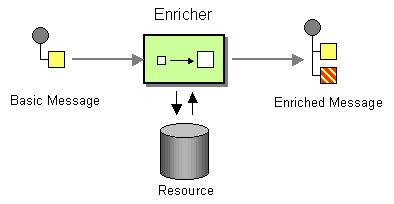
In Camel the Content Enricher can be done in several ways:
-
Using Enrich EIP, Poll Enrich, or Poll EIP
-
Using a Message Translator
-
Using a Processor with the enrichment programmed in Java
-
Using a Bean EIP with the enrichment programmed in Java
The most natural Camel approach is using Enrich EIP, which comes as two kinds:
-
Enrich EIP: This is the most common content enricher that uses a
Producerto obtain the data. It is usually used for Request Reply messaging, for instance, to invoke an external web service. -
Poll Enrich EIP: Uses a Polling Consumer to obtain the additional data. It is usually used for Event Message messaging, for instance, to read a file or download a file using FTP.
| This page documents the Poll Enrich EIP. |
Options
The Poll Enrich eip supports the following options which are listed below.
| Name | Description | Default | Type |
|---|---|---|---|
note | The note for this node. | String | |
description | The description for this node. | String | |
disabled | Whether to disable this EIP from the route during build time. Once an EIP has been disabled then it cannot be enabled later at runtime. | false | Boolean |
expression | Required The expression to compute the endpoint URI to poll-enrich from. | ExpressionDefinition | |
variableReceive | To use a variable to store the received message body (only body, not headers). This makes it handy to use variables for user data and to easily control what data to use for sending and receiving. | String | |
aggregationStrategy | Sets the AggregationStrategy to be used to merge the reply from the external service, into a single outgoing message. By default Camel will use the reply from the external service as outgoing message. | AggregationStrategy | |
aggregationStrategyMethodName | This option can be used to explicitly declare the method name to use, when using POJOs as the AggregationStrategy. | String | |
aggregationStrategyMethodAllowNull | If this option is false then the aggregate method is not used if there was no data to enrich. If this option is true then null values is used as the oldExchange (when no data to enrich), when using POJOs as the AggregationStrategy. | String | |
aggregateOnException | If this option is false then the aggregate method is not used if there was an exception thrown while trying to retrieve the data to enrich from the resource. Setting this option to true allows end users to control what to do if there was an exception in the aggregate method. | false | Boolean |
timeout | Timeout in millis when polling from the external service. A negative value waits until a message is available (could block indefinitely). Zero attempts to receive immediately without waiting. A positive value waits up to the given timeout. | -1 | String |
cacheSize | Sets the maximum size used by the ConsumerCache which is used to cache and reuse consumers when uris are reused. Use 0 for default cache size, or -1 to turn cache off. | Integer | |
ignoreInvalidEndpoint | Whether to ignore an invalid endpoint URI when trying to create a consumer with that endpoint. | false | Boolean |
allowOptimisedComponents | Whether to allow components to optimise if they are PollDynamicAware. | true | Boolean |
autoStartComponents | Whether to auto startup components when poll enricher is starting up. | true | Boolean |
allowedSchemes | Sets an optional comma-separated allow-list of component schemes that the dynamic recipient may resolve to (e.g. http,https). When set, a dynamic endpoint whose scheme is not in the list is rejected. This is a defence-in-depth restriction, useful for low-code / Kamelet deployments; by default (unset) any scheme is allowed. | String |
Exchange properties
The Poll Enrich eip supports the following exchange properties which are listed below.
The exchange properties are set on the Exchange by the EIP, unless otherwise specified in the description. This means those properties are available after this EIP has completed processing the Exchange.
| Name | Description | Default | Type |
|---|---|---|---|
CamelToEndpoint | Endpoint URI where this Exchange is being sent to. | String |
Content enrichment using Poll Enrich EIP
pollEnrich uses a Polling Consumer to obtain the additional data. It is usually used for Event Message messaging, for instance, to read a file or download a file using FTP.
The pollEnrich works just the same as enrich, however, as it uses a Polling Consumer, we have three methods when polling:
-
receive: Waits until a message is available and then returns it. Warning that this method could block indefinitely if no messages are available. -
receiveNoWait: Attempts to receive a message exchange immediately without waiting and returningnullif a message exchange is not available yet. -
receive(timeout): Attempts to receive a message exchange, waiting up to the given timeout to expire if a message is not yet available. Returns the message ornullif the timeout expired.
Poll Enrich with timeout
It is good practice to use timeout value.
By default, Camel will use the receive which may block until there is a message available. It is therefore recommended to always provide a timeout value, to make this clear that we may wait for a message until the timeout is hit.
You can pass in a timeout value that determines which method to use:
-
if timeout is
-1or other negative number thenreceiveis selected (Important: thereceivemethod may block if there is no message) -
if timeout is
0thenreceiveNoWaitis selected -
otherwise,
receive(timeout)is selected
The timeout values are in milliseconds.
Using Poll Enrich
The content enricher (pollEnrich) retrieves additional data from a resource endpoint in order to enrich an incoming message (contained in the original exchange).
An AggregationStrategy is used to combine the original exchange and the resource exchange. The first parameter of the AggregationStrategy.aggregate(Exchange, Exchange) method corresponds to the original exchange, the second parameter the resource exchange.
Here’s an example for implementing an AggregationStrategy, which merges the two data together as a String with colon separator:
public class ExampleAggregationStrategy implements AggregationStrategy {

    public Exchange aggregate(Exchange original, Exchange resource) {
        // this is just an example, for real-world use-cases the
        // aggregation strategy would be specific to the use-case

        if (resource == null) {
            return original;
        }
        Object oldBody = original.getIn().getBody();
        Object newBody = resource.getIn().getBody();
        original.getIn().setBody(oldBody + ":" + newBody);
        return original;
    }

}
You then use the AggregationStrategy with the pollEnrich in the following example, where Camel will poll a file (timeout 10 seconds). The AggregationStrategy is then used to merge the file with the existing Exchange.
-
Java
-
XML
-
YAML
AggregationStrategy aggregationStrategy = ...

from("direct:start")
  .pollEnrich("file:inbox?fileName=data.txt", 10000, aggregationStrategy)
  .to("mock:result");
<bean id="myStrategy" class="com.foo.ExampleAggregationStrategy"/>
<route>
<from uri="direct:start"/>
<pollEnrich timeout="10000" aggregationStrategy="myStrategy">
<constant>file:inbox?fileName=data.txt</constant>
</pollEnrich>
<to uri="mock:result"/>
</route>- route:
from:
uri: direct:start
steps:
- pollEnrich:
aggregationStrategy: myStrategy
timeout: 10000
expression:
constant:
expression: file:inbox?fileName=data.txt
- to:
uri: mock:resultUsing Poll Enrich with Rest DSL
You can also use pollEnrich with Rest DSL to, for example, download a file from AWS S3 as the response of an API call.
-
Java
-
XML
-
YAML
rest("/report")
  .get("/{id}/report")
    .to("direct:report");

from("direct:report")
  .pollEnrich("aws-s3:xavier-dev?amazonS3Client=#s3client&deleteAfterRead=false&fileName=report-file.pdf");
<rest path="/report">
<get path="/{id}/report">
<to uri="direct:report"/>
</get>
</rest>
<route>
<from uri="direct:report"/>
<pollEnrich>
<constant>aws-s3:xavier-dev?amazonS3Client=#s3client&deleteAfterRead=false&fileName=report-file.pdf</constant>
</pollEnrich>
</route>- rest:
path: /report
get:
- path: /{id}/report
to:
uri: direct:report
- route:
from:
uri: direct:report
steps:
- pollEnrich:
expression:
constant:
expression: "aws-s3:xavier-dev?amazonS3Client=#s3client&deleteAfterRead=false&fileName=report-file.pdf"Notice that the enriched endpoint is a constant, however, Camel also supports dynamic endpoints which is covered next.
Poll Enrich with Dynamic Endpoints
Both enrich and pollEnrich supports using dynamic uris computed based on information from the current Exchange.
For example to pollEnrich from an endpoint that uses a header to indicate a SEDA queue name:
-
Java
-
XML
-
YAML
from("direct:start")
  .pollEnrich().simple("seda:${header.queueName}")
  .to("direct:result");
<route>
<from uri="direct:start"/>
<pollEnrich>
<simple>seda:${header.queueName}</simple>
</pollEnrich>
<to uri="direct:result"/>
</route>- route:
from:
uri: direct:start
steps:
- pollEnrich:
expression:
simple:
expression: "seda:${header.queueName}"
- to:
uri: direct:result See the cacheSize option for more details on how much cache to use depending on how many or few unique endpoints are used. |
Using Poll Enrich with file based components
When using poll or pollEnrich with the file based components, then the eagerLimitMaxMessagesPerPoll option has changed default from false to true from Camel 4.13 onwards. Only use-cases where you need to sort the files first, requires to explicit set the option eagerLimitMaxMessagesPerPoll=false to make Camel scan for all files first before sorting, and then poll or pollEnrich will then pick the top file after the sorting.
This improves performance for use-cases without need for sorting first.