Configuring Registry
Every Camel K installation needs a container registry that will be used to host integration container images. This is required to host the images that will be used by Kubernetes to execute the Camel application you’ve built.
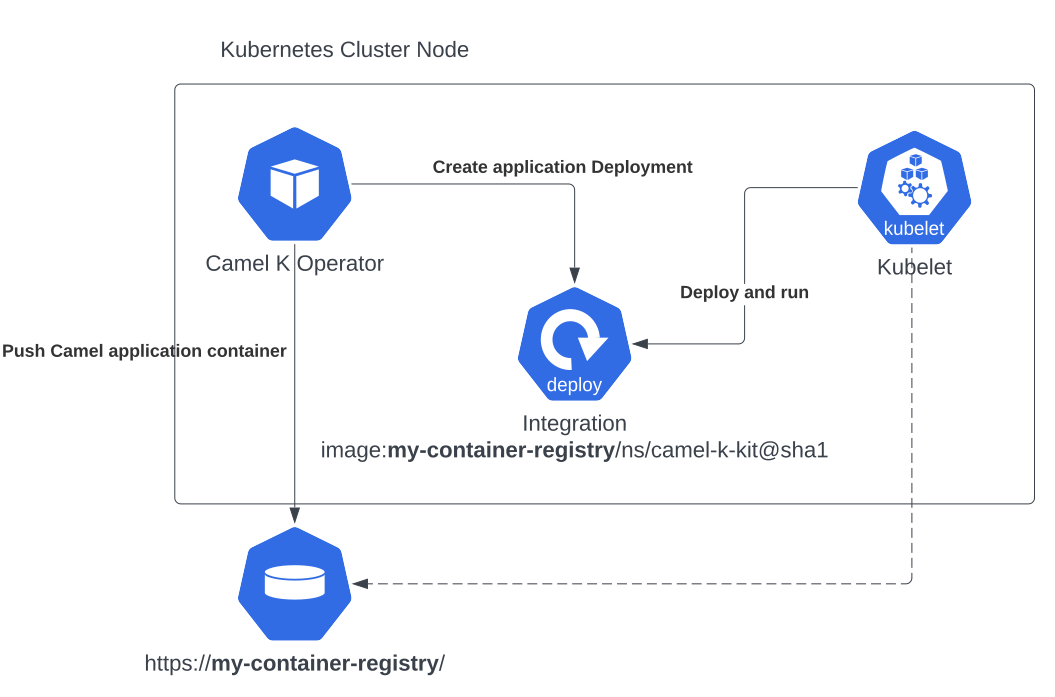
The Camel K operator is in charge to build a Camel application and to "containerize" it, storing the result into a container registry. The same registry is used by the cluster to run the Camel application. Basically the operator push the image and the cluster pull it from the same source.
For the reason above it’s important that you provide a container registry which is accessible from both the operator Pod and the cluster internal mechanisms. However, a default registry is available when running quick starts and demos.
When ready to move to a real enterprise environment, then you’re expected to configure the registry. You will need to add or edit any existing registry environment variable configuration according your installation method. These are the variables you can configure:
| Name | Description | Default Value |
|---|---|---|
REGISTRY_ADDRESS | Address (URL, hostname or IP address) of the container registry. | |
REGISTRY_INSECURE | Whether to allow insecure (non-TLS) connections to the registry. | false |
REGISTRY_SECRET | Name of the Kubernetes secret used for registry authentication. | |
REGISTRY_CA_CONFIGMAP | Name of the ConfigMap containing the registry CA certificate. | |
REGISTRY_ORGANIZATION | Organization or namespace within the registry used for images. | <operator-namespace> |
You need to provide at least the REGISTRY_ADDRESS parameter with a domain or an IP reachable by your cluster.
How to configure Camel K container registry
When running a production grade installation, you’ll be probably using a private container registry which is accessible via authenticated method. The secret is something that will be included at deployment time as imagePullSecret configuration.
Create a secret for your registry
The easiest way to create a Secret is to leverage the kubectl CLI:
kubectl create secret docker-registry registry --docker-server <my-registry-address> --docker-username <my-user> --docker-password <my-password> you must include --docker-server docker.io value also if you’re using Docker Hub. The default value provided by kubectl won’t. |
As each registry may have a slightly different way of securing the access you can use the generic guidelines provided in and adjust accordingly (more information in the Secret registry configuration guide). We expect that at the end of the process you have a public address (1) an organization (2) (optional, see details below) and a secret (3) values that will be used to configure the registry.
Deployment pull secret
When you’re using a secured registry protected via secret, you will also need to provide a secret via pull-secret.secretName trait parameter. We advice to separate the credentials used by the operator to push a container from the credentials required to pull the container. The operators requires write privileges, whilst the container only requires read privileges to get the container.
The read secret you will be using via trait configuration must be available in the same Integration namespace.
Role of the organization parameter
The organization parameter is optional. When it’s missing, the operator will use the operator namespace name to create an image within such organization name. When you’re using an container registry you may be limited to store image in a given organization only. In this case, you must provide the name of such organization with this option.
Container registry requirements
Each platform may have its default registry of choice. And each container registry may have a slight different configuration. Please, be aware that we won’t be able to support all the available solutions.
The only requirement we have is that the registry must be able to produce/consume images with the following tagging convention: <registry-host>[:<registry-port>]/<k8s-namespace>/kit-<hash-code>@sha256:<sha256-code>, ie 10.110.251.124/default/kit-ck0612dahvgs73ffe5g0@sha256:3c9589dd093b689aee6bf5c2d35aa1fce9d0e76d5bb7da8b61d87e7a1ed6f36a.
This should be within the standard convention adopted by pulling a Docker image by digest (immutable).
| you can configure Camel K to use an insecure private registry. However, your Kubernetes cluster may not be able to pull images from an insecure registry without proper configuration. |
Run your own container registry
You can also run your own registry, but this option is recommended only for advanced use cases as it may requires certain changes in the cluster configuration, so, make sure to understand how each change may affect your cluster. As you’ve seen in the diagram above, the cluster has to be aware of the presence of the registry in order to pull the images pushed by the operator.