Route Diagram
Available as of Camel 4.21
The camel-diagram component provides a route render functionality that can output visual diagrams of your Camel routes.
This feature can be used to automatically generate route diagrams as part of building and testing your projects.
For example as shown below:
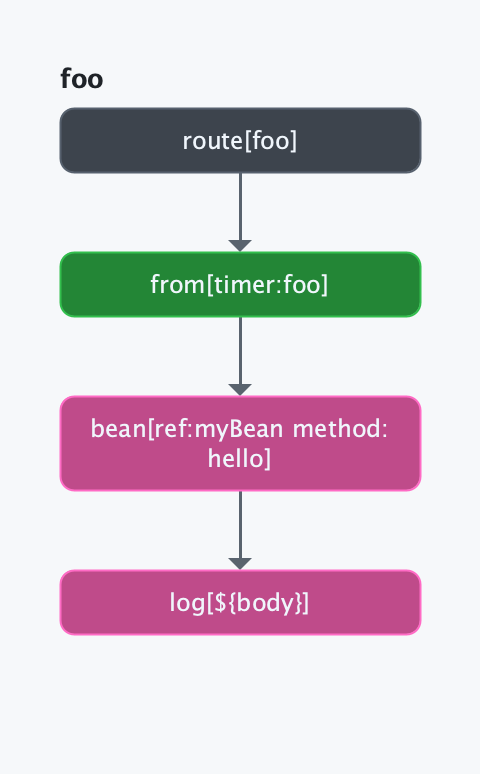
Generating Route Diagrams with Camel CLI
You can generate route diagrams with JBang such:
camel cmd route-diagram foo.yamlIt also works with Java source files:
camel cmd route-diagram MyRoute.javaJava routes are read by the Java DSL parser, without compiling them, so the diagram is ready in milliseconds and the source does not need its dependencies. A step the parser cannot work out, such as a lambda or a processor, is shown as a placeholder, and the parts it could not read are listed. Use --compile to compile the source and load its routes instead. The same applies to camel cmd route-topology and camel cmd route-structure.
And you can include multiple files:
camel cmd route-diagram MyRoute.java foo.yaml See more options with camel cmd route-diagram --help. |
And if you run Camel CLI with --console then the developer console also comes with this functionality, by opening the link: http://localhost:8080/q/dev/route-diagram
To see a topology diagram (how routes connect to each other) in the browser, use:
http://localhost:8080/q/dev/route-diagram?mode=topology
The topology view supports the following query parameters:
-
mode=topology— switch from route diagram (default) to topology diagram -
format=html— interactive SVG web component (default) -
format=png— static PNG image -
format=text— ASCII art,format=unicode— Unicode box-drawing characters -
external=true|false— include/exclude external systems such as Kafka, HTTP, etc. (default:true) -
metric=true|false— show live exchange counters (default:true)
Generating Route Diagrams with Camel Main
This is done by adding camel-diagram as test scoped dependency, and then adding a special unit test that is responsible for generating the route diagrams and saving them to a specified folder.
The following code shows how to do this.
package org.apache.camel.example;

import org.apache.camel.test.main.junit6.CamelMainTest;
import org.junit.jupiter.api.Test;

/**
 * To dump route diagram only once
 */
@CamelMainTest(mainClass = MyApplication.class, dumpRouteDiagramFolder = "doc")
class MainDiagramTest {

    @Test
    void empty() {
        // empty test method
    }

}
So when you run mvn test then this unit test is executed (together with your other tests), and it’s responsible for generating the route diagrams.
The diagrams would then be stored in the doc folder, as specified in the dumpRouteDiagramFolder parameter on the @CamelMainTest annotation.
Generating Route Diagrams with Spring Boot
This is done by adding camel-diagram as test scoped dependency, and then adding a special unit test that is responsible for generating the route diagrams and saving them to a specified folder.
The following code shows how to do this.
package sample.camel;

import org.apache.camel.test.spring.junit6.CamelSpringBootTest;
import org.apache.camel.test.spring.junit6.EnableRouteDiagramDump;
import org.junit.jupiter.api.Test;
import org.springframework.boot.test.context.SpringBootTest;

/**
 * To dump route diagram only once
 */
@CamelSpringBootTest
@SpringBootTest(classes = MyCamelApplication.class)
@EnableRouteDiagramDump(folder = "doc")
public class DumpRouteDiagramTest {

    @Test
    public void empty() {
        // noop
    }

}
So when you run mvn test then this unit test is executed (together with your other tests), and it’s responsible for generating the route diagrams.
The diagrams would then be stored in the doc folder, as specified in the folder parameter on the @EnableRouteDiagramDump annotation.
Route Topology Diagrams
In addition to individual route diagrams, Camel can generate route topology diagrams that show how routes connect to each other. While a route diagram shows the internal processors within a single route, a topology diagram gives you a bird’s-eye view of your entire application — which routes send messages to which other routes, and optionally which external systems (Kafka, HTTP, databases, etc.) are involved.
Topology vs Route Diagram
-
Route Diagram: Shows the internal structure of a single route — the processors, EIPs, and endpoints within it.
-
Topology Diagram: Shows connections between routes — how routes are wired together via shared endpoints like
direct,seda,kafka, etc.
External Endpoints
External systems such as Kafka brokers, HTTP services, databases, and cloud services can be shown as separate nodes in the topology diagram. This makes it easy to see how your Camel routes interact with the outside world.
Endpoint Identity
Some components use query parameters to identify different destinations. For example, couchbase:http://host:8091?bucket=orders and couchbase:http://host:8091?bucket=invoices target different buckets. Camel uses endpointIdentity metadata on component parameters to correctly match endpoints — two URIs that differ only in identity parameters are treated as different destinations in the topology.
Generating Topology Diagrams with Camel CLI
When running with Camel CLI, you can generate topology diagrams via:
camel cmd route-topologyAdd --theme=unicode --errors to draw the error handling as well: the routes reached only while a failure is handled, in a frame of their own below the routes (see Diagram).
See camel cmd route-topology for more details.
The developer console is also available at: http://localhost:8080/q/dev/route-topology (JSON/text data), or as a visual HTML diagram at: http://localhost:8080/q/dev/route-diagram?mode=topology
Generating Topology Diagrams during mvn test
When using @CamelMainTest or @EnableRouteDiagramDump to generate route diagrams, a topology diagram is also generated by default. The topology diagram is saved as <context-name>-topology.png in the same output folder.
You can control topology generation with the following options:
-
topology— Whether to generate a topology diagram (default:true) -
topologyExternal— Whether to include external systems in the topology (default:true) -
errors(dumpRouteDiagramErrorsin@CamelMainTest) — Whether to draw the error handling: theonExceptionclauses of each route in a frame below its steps, and the routes reached only on error in a frame below the other routes of the topology. Otherwise a route diagram draws only the steps of the route (default:false)