# Message History
Camel supports the [Message History](https://www.enterpriseintegrationpatterns.com/patterns/messaging/MessageHistory.md) from the [EIP patterns](enterprise-integration-patterns.md) book.
The Message History from the EIP patterns allows for analyzing and debugging the flow of messages in a loosely coupled system.
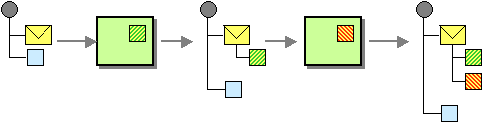
Attaching a Message History to the message will provide a list of all applications that the message has passed through since its origination.
## Enabling Message History
The message history is disabled by default (to optimize for lower footprint out of the box). You should only enable message history if needed, such as during development, where Camel can report route stack-traces when a message failed with an exception. But for production usage, then message history should only be enabled if you have monitoring systems that rely on gathering these fine-grained details. When message history is enabled then there is a slight performance overhead as the history data is stored in a `java.util.concurrent.CopyOnWriteArrayList` due to the need of being thread safe.
The Message History can be enabled or disabled per CamelContext or per route (disabled by default). For example, you can turn it on with:
- Java
- Spring XML
- Application Properties
```java
camelContext.setMessageHistory(true);
```
```xml
```
It is often easier to configure this in the `application.properties` file:
```properties
camel.main.messageHistory = true
```
Or when using Spring Boot or Quarkus, you can enable this in the configuration file:
- Quarkus
- Spring Boot
```properties
camel.quarkus.message-history = true
```
```properties
camel.main.message-history = true
```
### Route level Message History
You can also enable or disable message history per route. When doing this, then Camel can only gather message history in the routes where this is enabled, which means you may not have full coverage. You may still want to do this, for example, to capture the history in a critical route to help pinpoint where the route is slow.
A route level configuration overrides the global configuration.
To enable per route:
- Java
- XML
- YAML
```java
from("jms:cheese")
.messageHistory()
.to("bean:validate")
.to("bean:transform")
.to("jms:wine");
```
```xml
```
```yaml
- route:
messageHistory: "true"
from:
uri: jms:cheese
steps:
- to:
uri: bean:validate
- to:
uri: bean:transform
- to:
uri: jms:wine
```
You can also turn off message history per route:
- Java
- XML
- YAML
```java
from("jms:cheese")
.messageHistory(false)
.to("bean:validate")
.to("bean:transform")
.to("jms:wine");
```
```xml
```
```yaml
- route:
messageHistory: "true"
from:
uri: jms:cheese
steps:
- to:
uri: bean:validate
- to:
uri: bean:transform
- to:
uri: jms:wine
```
### Enabling source location information
Camel is capable of gathering precise source file:line-number for each EIPs in the routes. When enabled, then the message history will output this information in the route stack-trace.
To enable source location:
Java
```java
camelContext.setSourceLocationEnabled(true);
```
Spring XML
```xml
```
Application Properties
\+ It is often easier to configure this in the `application.properties` file:
+
```properties
camel.main.source-location-enabled = true
```
Or when using Spring Boot or Quarkus, you can enable this in the configuration file:
- Quarkus
- Spring Boot
```properties
camel.quarkus.source-location-enabled = true
```
```properties
camel.main.source-location-enabled = true
```
## Route stack-trace in exceptions logged by error handler
If Message History is enabled, then Camel will include this information, when the [Error Handler](../../../manual/error-handler.md) logs exhausted exceptions, where you can see the message history; you may think this as a "route stacktrace".
And example is provided below:
```text
2022-01-06 12:13:06.721 ERROR 67729 --- [ - timer://java] o.a.c.p.e.DefaultErrorHandler : Failed delivery for (MessageId: B4365D4CED3E5E1-0000000000000004 on ExchangeId: B4365D4CED3E5E1-0000000000000004). Exhausted after delivery attempt: 1 caught: java.lang.IllegalArgumentException: The number is too low
Message History (source location is disabled)
---------------------------------------------------------------------------------------------------------------------------------------
Source ID Processor Elapsed (ms)
route1/route1 from[timer://java?period=2s] 2
route1/setBody1 setBody[bean[MyJavaRouteBuilder method:randomNumbe 0
route1/log1 log 1
route1/filter1 filter[simple{${body} < 30}] 0
route1/throwException1 throwException[java.lang.IllegalArgumentException] 0
Stacktrace
---------------------------------------------------------------------------------------------------------------------------------------
java.lang.IllegalArgumentException: The number is too low
at sample.camel.MyJavaRouteBuilder.configure(MyJavaRouteBuilder.java:34) ~[classes/:na]
at org.apache.camel.builder.RouteBuilder.checkInitialized(RouteBuilder.java:607) ~[camel-core-model-3.20.0.jar:3.20.0]
at org.apache.camel.builder.RouteBuilder.configureRoutes(RouteBuilder.java:553) ~[camel-core-model-3.20.0.jar:3.20.0]
```
When Message History is enabled, then the full history is logged as shown above. Here we can see the full path the message has been routed.
When Message History is disabled, as it is by default, then the error handler logs a brief history with the last node where the exception occurred as shown below:
```text
2022-01-06 12:12:32.072 ERROR 67704 --- [ - timer://java] o.a.c.p.e.DefaultErrorHandler : Failed delivery for (MessageId: CD6D1B185A3706F-0000000000000004 on ExchangeId: CD6D1B185A3706F-0000000000000004). Exhausted after delivery attempt: 1 caught: java.lang.IllegalArgumentException: The number is too low
Message History (source location and message history is disabled)
---------------------------------------------------------------------------------------------------------------------------------------
Source ID Processor Elapsed (ms)
route1/route1 from[timer://java?period=2s] 2
...
route1/throwException1 throwException[java.lang.IllegalArgumentException] 0
Stacktrace
---------------------------------------------------------------------------------------------------------------------------------------
java.lang.IllegalArgumentException: The number is too low
at sample.camel.MyJavaRouteBuilder.configure(MyJavaRouteBuilder.java:34) ~[classes/:na]
at org.apache.camel.builder.RouteBuilder.checkInitialized(RouteBuilder.java:607) ~[camel-core-model-3.20.0.jar:3.20.0]
at org.apache.camel.builder.RouteBuilder.configureRoutes(RouteBuilder.java:553) ~[camel-core-model-3.20.0.jar:3.20.0]
```
Here you can see the Message History only outputs the input (route1) and the last step where the exception occurred (throwException1).
Notice that the source column is empty because the source location is not enabled. When enabled then, you can see exactly which source file and line number the message routed:
```text
2022-01-06 12:19:01.277 ERROR 67870 --- [ - timer://java] o.a.c.p.e.DefaultErrorHandler : Failed delivery for (MessageId: 37412D6F722F679-0000000000000003 on ExchangeId: 37412D6F722F679-0000000000000003). Exhausted after delivery attempt: 1 caught: java.lang.IllegalArgumentException: The number is too low
Message History
---------------------------------------------------------------------------------------------------------------------------------------
Source ID Processor Elapsed (ms)
MyJavaRouteBuilder:29 route1/route1 from[timer://java?period=2s] 10
MyJavaRouteBuilder:32 route1/setBody1 setBody[bean[MyJavaRouteBuilder method:randomNumber 1
MyJavaRouteBuilder:33 route1/log1 log 1
MyJavaRouteBuilder:34 route1/filter1 filter[simple{${body} < 30}] 0
MyJavaRouteBuilder:35 route1/throwException1 throwException[java.lang.IllegalArgumentException] 0
Stacktrace
---------------------------------------------------------------------------------------------------------------------------------------
java.lang.IllegalArgumentException: The number is too low
at sample.camel.MyJavaRouteBuilder.configure(MyJavaRouteBuilder.java:34) ~[classes/:na]
at org.apache.camel.builder.RouteBuilder.checkInitialized(RouteBuilder.java:607) ~[camel-core-model-3.20.0.jar:3.20.0]
at org.apache.camel.builder.RouteBuilder.configureRoutes(RouteBuilder.java:553) ~[camel-core-model-3.20.0.jar:3.20.0]
```
In this case we can see its the `MyJavaRouteBuilder` class on line 35 that is the problem.
### Configuring route stack-trace from error handler
You can turn off logging Message History with `logExhaustedMessageHistory` from the [Error Handler](../../../manual/error-handler.md) using:
_Java-only: disabling message history logging on the error handler_
```java
errorHandler(defaultErrorHandler().logExhaustedMessageHistory(false));
```
The [Error Handler](../../../manual/error-handler.md) does not log the message body/header details (to avoid logging sensitive message body details). You can enable this with `logExhaustedMessageBody` on the error handler as shown:
- Java
- Spring XML
- YAML
```java
errorHandler(defaultErrorHandler().logExhaustedMessageBody(true));
```
In XML configuring this is a bit different, as you configure this in the `redeliveryPolicy` of the `` as shown:
```xml
```
```yaml
- errorHandler:
defaultErrorHandler:
redeliveryPolicy:
logExhaustedMessageHistory: false
logExhaustedMessageBody: true
- route:
from:
uri: jms:cheese
steps:
- to:
uri: bean:validate
- to:
uri: bean:transform
- to:
uri: jms:wine
```
## MessageHistory API
When message history is enabled during routing Camel captures how the `Exchange` is routed, as an `org.apache.camel.MessageHistory` entity that is stored on the `Exchange`.
On the `org.apache.camel.MessageHistory` there is information about the route id, processor id, timestamp, and elapsed time it took to process the `Exchange` by the processor.
You can access the message history from Java code:
_Java-only: accessing the message history from the Exchange_
```java
List list = exchange.getProperty(Exchange.MESSAGE_HISTORY, List.class);
for (MessageHistory history : list) {
System.out.println("Routed at id: " + history.getNode().getId());
}
```
## Configuring MessageHistory format
The Message History format in Camel is controlled by `Java String.format` patterns stored as global options on the CamelContext.
The defaults are defined in [`MessageHelper.java`](https://github.com/apache/camel/blob/main/core/camel-support/src/main/java/org/apache/camel/support/MessageHelper.java):
_Java-only: default message history format patterns_
```java
private static final String MESSAGE_HISTORY_HEADER = "%-40s %-30s %-50s %-12s";
private static final String MESSAGE_HISTORY_OUTPUT = "%-40.40s %-30.30s %-50.50s %12.12s";
```
You can customize it using `application.properties`:
```properties
camel.main.global-options[CamelMessageHistoryHeaderFormat] = %-40s %-30s %-120s %-12s
camel.main.global-options[CamelMessageHistoryOutputFormat] = %-40.40s %-30.30s %-290.290s %12.12s
```
If you want to configure the message format for a specific exchange, you can do it programmatically:
_Java-only: configuring custom message history format on the CamelContext_
```java
camelContext.getGlobalOptions().put(Exchange.MESSAGE_HISTORY_HEADER_FORMAT,
"%-40s %-30s %-120s %-12s");
camelContext.getGlobalOptions().put(Exchange.MESSAGE_HISTORY_OUTPUT_FORMAT,
"%-40.40s %-30.30s %-120.120s %12.12s");
```