# Dead Letter Channel
Camel supports the [Dead Letter Channel](http://www.enterpriseintegrationpatterns.com/DeadLetterChannel.md) from the [EIP patterns](enterprise-integration-patterns.md) using the [DeadLetterChannel](https://www.javadoc.io/doc/org.apache.camel/camel-core-processor/current/org/apache/camel/processor/errorhandler/DeadLetterChannel.md) processor, which is an [Error Handler](../../../manual/error-handler.md).
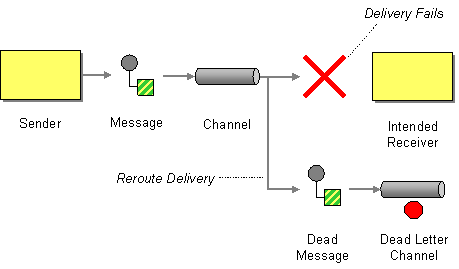
The Dead Letter Channel is an [Error Handler](../../../manual/error-handler.md) that implements the principles from the Dead Letter Channel EIP. From the illustration above, we can see the pattern is that if a message cannot be processed or fails during sending, it should be moved to a dead letter queue. The dead letter queue is based on a Camel [Endpoint](message-endpoint.md), allowing you to use any of the many Camel components, such as a file system, database, or a log.
The Dead Letter Channel is similar to the default error handler, but with the following differences:
- The dead letter channel is the only error handler that supports moving failed messages to a dedicated error queue, known as the dead letter queue (is a Camel endpoint).
- Unlike the default error handler, the dead letter channel will, by default, handle exceptions and move the failed messages to the dead letter queue.
- The dead letter channel is by default configured to not log any activity when it handles exceptions.
- The dead letter channel supports using the original input message when a message is moved to the dead letter queue.
## Using Dead Letter Error Handler
When using the dead letter channel error handler, you must configure the dead letter queue as an endpoint, so the handler knows where to move the failed messages. This is done a bit differently in the Java DSL and Spring XML DSL.
For example, here’s how to log the message at `ERROR` level:
- Java
- Spring XML
- YAML
```java
errorHandler(deadLetterChannel("log:dead?level=ERROR"));
```
```xml
```
```yaml
- errorHandler:
deadLetterChannel:
deadLetterUri: "log:dead?level=ERROR"
```
Pay attention to Spring XML DSL. The type attribute is used to declare which error handler to use, here its `DeadLetterChannel`. And in XML the `` must be configured with an id. The id must then be enabled on either the `` (global scope), or per route that should use this error handler.
The following listing is an equivalent of the prior Java DSL listing:
_XML-only:_
```xml
```
Notice how we have enabled the error handler on the `` via `errorHandlerRef` which means this error handler is used globally. You can override this per route, and have individual routes used another error handler.
> **Note**
> The DSLs is planned to be improved in the near future to have a unified way of configuring error handling across all DSLs with [Route Configuration](../../../manual/route-configuration.md). When fully implemented, then configuring error handler in Java and Spring XML DSL would be much more similar than currently.
### Redelivery
It is common for a temporary outage or database deadlock to cause a message to fail to process; but the chances are if it is tried a few more times with some time delay then it will complete fine. So we typically wish to use some kind of redelivery policy to decide how many times to try to redeliver a message and how long to wait before redelivery attempts.
The [RedeliveryPolicy](https://www.javadoc.io/doc/org.apache.camel/camel-base/current/org/apache/camel/processor/errorhandler/RedeliveryPolicy.md) defines how the message is to be redelivered. You can customize things like:
- how many times a message is attempted to be redelivered before it is considered a failure and sent to the dead letter channel
- the initial redelivery timeout
- using exponential backoff (i.e., the time between retries increases using a backoff multiplier)
- whether to use collision avoidance to add some randomness to the timings
- delay pattern
- whether to allow redelivery during stopping/shutdown
Only when all redelivery attempts have failed, then the message is moved to the dead letter queue.
#### Redelivery default values
Redelivery is disabled by default.
The default redeliver policy will use the following values:
- The `maximumRedeliveries` is set to 0.
- The `redeliveryDelay` is set to 1000 milliseconds (1 second).
- The `maximumRedeliveryDelay` = 60 \* 1000L (60 seconds).
- And the exponential backoff and collision avoidance are turned off.
- The `retriesExhaustedLogLevel` is set to `LoggingLevel.ERROR`.
- The `retryAttemptedLogLevel` is set to `LoggingLevel.DEBUG`.
- Stack traces are logged for exhausted messages.
- Handled exceptions are not logged.
- The `allowRedeliveryWhileStopping` is set to `true`.
- The `logExhaustedMessageHistory` is set to `false`.
- The `logExhaustedMessageBody` is disabled by default to avoid logging sensitive message body/header details. If this option is true, then `logExhaustedMessageHistory` must also be true.
The maximum redelivery delay ensures that a delay is never longer than the value, default 1 minute. This can happen if you turn on the exponential backoff.
The maximum redeliveries are the number of redelivery attempts. Setting the `maximumRedeliveries` to a negative value such as -1 will then always redelivery (unlimited). Setting the `maximumRedeliveries` to 0 will disable any redelivery attempt.
Camel will log delivery failures at the DEBUG logging level by default. You can change this by specifying `retriesExhaustedLogLevel` and/or `retryAttemptedLogLevel`.
You can turn logging of stack traces on/off. If turned off Camel will still log the redelivery attempt, it’s just much less verbose.
There are more options for fine-tuned logging configurations which you can find at [RedeliveryPolicy](https://www.javadoc.io/doc/org.apache.camel/camel-core-processor/current/org/apache/camel/processor/errorhandler/RedeliveryPolicy.md).
### What happens when an exception is thrown during sending to the dead letter queue?
When the Dead Letter Channel moves a message to the dead letter endpoint, and a new Exception is thrown, then the new caused exception is logged at WARN level (can be turned off by setting `logNewException` to false) and Camel stops processing the message. This ensures that the Dead LetterChannel will always succeed.
If you do not want this behaviour you can configure `deadLetterHandleNewException` to false, which then causes the dead letter channel to fail and propagate back the new Exception, which causes Camel to fail processing the message.
### What happens when an Exchange is moved to the dead letter queue?
When all attempts of redelivery have failed, the [Exchange](../../../manual/exchange.md) is moved to the dead letter queue. The exchange is then complete, and from the client point of view, the message is done being processed.
For instance, configuring the dead letter channel as:
- Java
- Spring XML
- YAML
```java
errorHandler(deadLetterChannel("jms:queue:dead")
.maximumRedeliveries(3).redeliveryDelay(5000));
```
```xml
```
```yaml
- errorHandler:
deadLetterChannel:
deadLetterUri: jms:queue:dead
redeliveryPolicy:
maximumRedeliveries: 3
redeliveryDelay: "5000"
```
The Dead Letter error handler will clear the caused exception (`setException(null)`), by moving the caused exception to a property on the [Exchange](../../../manual/exchange.md), with the key `Exchange.EXCEPTION_CAUGHT`. Then the [Exchange](../../../manual/exchange.md) is moved to the `jms:queue:dead` destination, and the client will not notice the failure.
### Moving the original message to the dead letter queue
The option `useOriginalMessage` is used for routing the original input message instead of the current message that potentially is modified during routing.
For instance, if you have this route:
- Java
- XML
- YAML
```java
from("jms:queue:order:input")
.to("bean:validateOrder")
.to("bean:transformOrder")
.to("bean:handleOrder");
```
```xml
```
```yaml
- route:
from:
uri: jms:queue:order:input
steps:
- to:
uri: bean:validateOrder
- to:
uri: bean:transformOrder
- to:
uri: bean:handleOrder
```
The route listens for JMS messages and validates, transforms and handles it. During this the [Exchange](../../../manual/exchange.md) payload is transformed/modified in the various bean stages.
Now suppose that if an exception is thrown, we want to move the message to the dead letter queue. However, the message moved to the dead letter queue (by default) is the current message. Suppose at one time there is an exception in the `validateOrder`, and another time an exception thrown by transformOrder, and yet also in handleOrder. In all these different situations, the message may be changed.
By enabling `useOriginalMessage` on the dead letter channel, then the message moved to the dead letter queue would be the original incoming message.
> **Note**
> There is also a **useOriginalBody** option, which only keeps the original message body, and does not change the message headers.
- Java
- Spring XML
- YAML
```java
// will use the original message (body and headers)
errorHandler(deadLetterChannel("jms:queue:dead")
.useOriginalMessage().maximumRedeliveries(5).redeliveryDelay(5000);
```
And in XML, you set `useOriginalMessage=true` on the `` as shown:
```xml
```
```yaml
- errorHandler:
deadLetterChannel:
deadLetterUri: jms:queue:dead
useOriginalMessage: true
redeliveryPolicy:
maximumRedeliveries: 5
redeliveryDelay: "5000"
```
Then the messages routed to the `jms:queue:dead` is the original input. If we want to manually retry, we can move the JMS message from the failed to the input queue, with no problem as the message is the same as the original we received.
#### Boundary of the original message
The original input means the input message is bounded by the current unit of work. A unit of work typically spans one route, or multiple routes if they are connected using internal endpoints such as direct or seda. When messages are passed via external endpoints such as JMS or HTT, then the consumer will create a new unit of work, with the message it received as input as the original input. Also, some EIP patterns such as splitter, multicast, will create a new unit of work boundary for the messages in their sub-route (i.e., the _split_ message); however, these EIPs have an option named `shareUnitOfWork` which allows combining with the parent unit of work and ends up using the parent original message.
### Calling a processor before redelivery using OnRedelivery
When the Dead Letter Channel is doing redelivery, it’s possible to configure a [Processor](../../../manual/processor.md) executed just _before_ every redelivery attempt. This can be used for situations where you need to alter the message before it’s redelivered.
For example, you can do:
- Java
- Spring XML
- YAML
```java
errorHandler(deadLetterChannel("jms:queue:dead")
.maximumRedeliveries(3)
.onRedeliver(new MyOnRedeliveryProcessor());
```
And in XML DSL, you specify a bean id via `onRedeliveryRef` on the `` as shown:
```xml
```
```yaml
- errorHandler:
deadLetterChannel:
deadLetterUri: jms:queue:dead
onRedeliveryRef: myRedeliveryProcessor
redeliveryPolicy:
maximumRedeliveries: 3
```
> **Tip**
> Camel also supports [onException](../../../manual/exception-clause.md) to use `onRedeliver`. This means you can do special on redelivery for different exceptions, as opposed to `onRedelivery` set on Dead Letter Channel (or [Default Error Handler](../../../manual/defaulterrorhandler.md)) can be viewed as global scoped.
### Calling a processor before sending a message to the dead letter queue using OnPrepareFailure
Before the exchange is sent to the dead letter queue, you can use `onPrepare` to allow a custom `Processor` to prepare the exchange, such as adding information why the Exchange failed.
For example, the following processor adds a header with the exception message:
_Java-only: custom Processor to prepare the Exchange before sending to the dead letter queue_
```java
public static class MyPrepareProcessor implements Processor {
@Override
public void process(Exchange exchange) throws Exception {
Exception cause = exchange.getProperty(Exchange.EXCEPTION_CAUGHT, Exception.class);
exchange.getIn().setHeader("FailedBecause", cause.getMessage());
}
}
```
Then configure the error handler to use the processor as follows:
- Java
- Spring XML
- YAML
```java
errorHandler(deadLetterChannel("jms:dead").onPrepareFailure(new MyPrepareProcessor()));
```
Configuring this from Spring XML is done with the `onPrepareFailureRef` to refer to the processor as a `` as shown:
```xml
```
```yaml
- errorHandler:
deadLetterChannel:
deadLetterUri: jms:dead
onPrepareFailureRef: myPrepare
```
### Calling a processor when an exception occurred
With the `onExceptionOccurred` you can call a custom processor right after an exception was thrown, and the Dead Letter Channel is about to decide what to do (either to schedule a redelivery, or move the message into the dead letter queue).
In other words, this happens right after the exception was thrown, where you may want to do some custom logging, or something else.
For example, you may have a `Processor` that does some special logging:
_Java-only: custom Processor for logging when an exception occurs_
```java
public static class OnErrorLogger implements Processor {
@Override
public void process(Exchange exchange) throws Exception {
Exception cause = exchange.getProperty(Exchange.EXCEPTION_CAUGHT, Exception.class);
String msg = "Something went wrong due to " + cause.getMessage();
// do some custom logging here
}
}
```
You can then configure the Dead Letter Channel to use this as shown:
- Java
- Spring XML
- YAML
```java
errorHandler(deadLetterChannel("jms:dead").onExceptionOccurred(new OnErrorLogger()));
```
Configuring this from Spring XML is done with the `onExceptionOccurredRef` to refer to the processor as a `` as shown:
```xml
```
```yaml
- errorHandler:
deadLetterChannel:
deadLetterUri: jms:dead
onExceptionOccurredRef: myErrorLogger
```
### Redeliver Delay Pattern
Delay pattern is used as a single option to set a range pattern for delays. If used, then the following options do not apply: (delay, `backOffMultiplier`, `useExponentialBackOff`, `useCollisionAvoidance`, `maximumRedeliveryDelay`).
The idea is to set groups of ranges using the following syntax: `limit:delay;limit 2:delay 2;limit 3:delay 3;…;limit N:delay N`
Each group has two values separated with colon
- `limit` = upper limit
- `delay` = delay in milliseconds. The groups are separated with semicolon. The rule of thumb is that the next groups should have a higher limit than the previous group.
Let’s clarify this with an example:
```properties
delayPattern=5:1000;10:5000;20:20000
```
That gives us 3 groups:
- 5:1000
- 10:5000
- 20:20000
Resulting in these delays for redelivery attempt:
- Redelivery attempt number `1..4` = 0 millis (as the first group starts with 5)
- Redelivery attempt number `5..9` = 1000 millis (the first group)
- Redelivery attempt number `10..19` = 5000 millis (the second group)
- Redelivery attempt number `20..` = 20000 millis (the last group)
> **Note**
> The first redelivery attempt is 1, so the first group should start with 1 or higher.
You can start a group with limit 1 to have a starting delay:
```properties
delayPattern=1:1000;5:5000
```
- Redelivery attempt number `1..4 = 1000` millis (the first group)
- Redelivery attempt number `5.. = 5000` millis (the last group)
There is no requirement that the next delay should be higher than the previous. You can use any delay value you like. For example with:
```properties
delayPattern=1:5000;3:1000
```
We start with a 5 sec delay and then later reduce that to 1 second.
### State of redelivery as message headers
When a message is redelivered, the Dead Letter Channel will append the following headers to the message with the state of the redelivery:
| Header | Type | Description |
| --- | --- | --- |
| `Exchange.REDELIVERED` | `Boolean` | Whether the message is redelivered |
| `Exchange.REDELIVERY_COUNTER` | `Integer` | The current redelivery attempt |
| `Exchange.REDELIVERY_MAX_COUNTER` | `Integer` | The maximum number of redeliveries configured (if any). This header is absent if you use `retryWhile` or have unlimited maximum redelivery configured. |
### Which endpoint failed?
During routing messages, Camel will store an exchange property with the most recent endpoint in use (send to):
_Java-only: accessing the last endpoint URI from the Exchange_
```java
String lastEndpointUri = exchange.getProperty(Exchange.TO_ENDPOINT, String.class);
```
The `Exchange.TO_ENDPOINT` have the constant value `CamelToEndpoint`.
This information is updated when Apache Camel sends a message to any endpoint.
When, for example, processing the [Exchange](../../../manual/exchange.md) at a given [Endpoint](../../../manual/endpoint.md) and the message is to be moved into the dead letter queue, then Camel also decorates the Exchange with another property that contains that **last** endpoint:
_Java-only: accessing the failure endpoint URI from the Exchange_
```java
String failedEndpointUri = exchange.getProperty(Exchange.FAILURE_ENDPOINT, String.class);
```
The `Exchange.FAILURE_ENDPOINT` have the constant value `CamelFailureEndpoint`.
This allows, for example, you to fetch this information in your dead letter queue and use that for error reporting. This is particularly usable if the Camel route uses dynamic EIPs such as [Recipient List](recipientList-eip.md) or [ToD](toD-eip.md), where the target endpoint uri would be stored as information.
This information is kept on the Exchange even if the message was successfully processed by a given endpoint, and then later fails, for example, in local [Bean](bean-eip.md) EIP processing instead. So beware that this is a hint that helps pinpoint errors to [Endpoints](../../../manual/endpoint.md), and not EIPs.
- Java
- XML
- YAML
```java
from("activemq:queue:foo")
.to("http://someserver/somepath")
.bean("foo");
```
```xml
```
```yaml
- route:
from:
uri: activemq:queue:foo
steps:
- to:
uri: http://someserver/somepath
- bean:
ref: foo
```
Now suppose the route above, and a failure happens in the `foo` bean. Then the `Exchange.TO_ENDPOINT` and `Exchange.FAILURE_ENDPOINT` will still contain the value of `http://someserver/somepath`.
### Which route failed?
When a message is moved into the dead letter queue, then Camel will store the id of the route, where the message failed. This information can be obtained in Java via:
_Java-only: accessing the failure route id from the Exchange_
```java
String failedRouteId = exchange.getProperty(Exchange.FAILURE_ROUTE_ID, String.class);
```
The `Exchange.FAILURE_ROUTE_ID` have the constant value `CamelFailureRouteId`.
This allows, for example, you to fetch this information in your dead letter queue and use that for error reporting.
### Control if redelivery is allowed during stopping/shutdown
The option `allowRedeliveryWhileStopping` (default is `true`) controls whether redelivery is allowed or not, during stopping Camel or the route. This only applies to any potential new redelivery attempts; any currently ongoing redeliveries are still being executed.
This option can only disallow any redelivery to be executed **after** the stopping of a route/shutdown of Camel has been triggered.
If a redelivery is disallowed then a `RejectedExecutionException` exception is set on the Exchange, and it stops being routed. The outcome of the Exchange is then a failure due the `RejectedExecutionException`.